Strategies
Your ads, clear and under your control.
Strategies brings your Meta, Google and TikTok ads together. You see what you spend and what each one brings you, Bephic recommends what to change, and you decide. Nothing is spent without your yes.
What Strategies is
Strategies is where Bephic looks after your ads on Meta (Facebook and Instagram), Google and TikTok. It reads your numbers every day, watches for what wears out or goes off the normal and proposes one step at a time.
It works on your own ad account, including the campaigns you created outside Bephic. You say “Yes, do it” or “Not now”, and everything is recorded in “What was done”.
What you spend and what it brings you
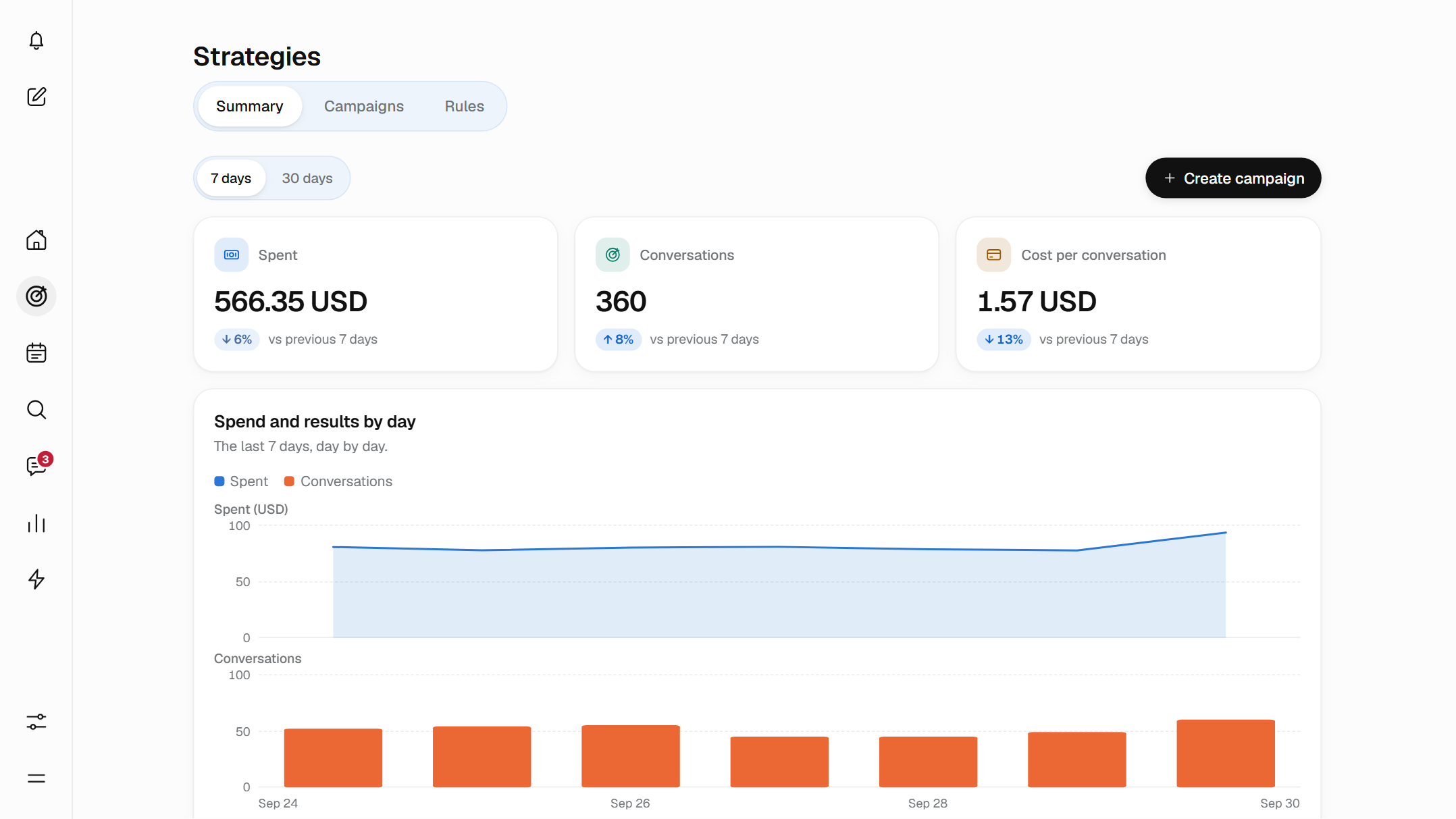
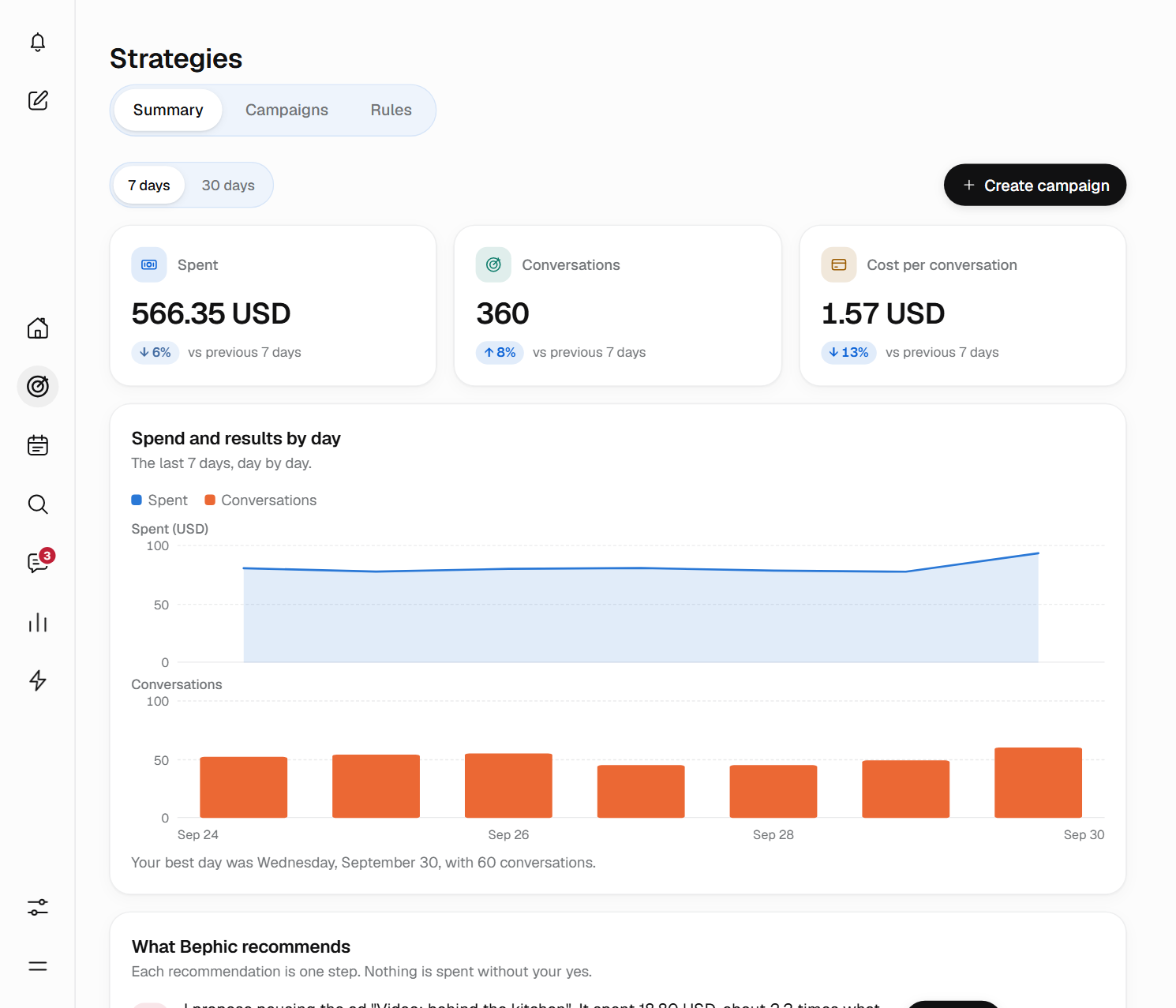
At the top of the Overview you see what was spent, what your ads brought (conversations, appointments or sales, depending on your business) and what each one cost. With 7 days, each number says whether it is up or down on the 7 days before.
Below, spend and results day by day, and a sentence about your best day. If you use more than one platform, you pick All, Meta, Google or TikTok, or compare them side by side.
All money is shown in the currency of your ad account. Next to each campaign, Bephic puts one word that sums up how it is doing, worked out from your own numbers.
- Working
- It brings results cheaper than your average, and Bephic is fairly sure.
- Not working
- Each result costs much more than your average, after spending enough to know.
- Still learning
- It has not yet spent enough or run enough days to judge. Give it time.
- To watch
- It is not clear: it may get better or worse. Bephic keeps watching it.
Bephic recommends, you decide
“What Bephic recommends” shows up to eight proposals, the most important first. Each one is a single step and says, with your numbers, what Bephic would do, why and what it expects to happen.
- Yes, do itOn paid plans, Bephic makes the change. On the free plan it tells you what to change and you change it.
- Not nowNothing happens. The proposal goes away and Bephic tells you again if something changes.
- If something failsIt says nothing changed. Nothing is ever changed halfway.
Pause “Video: behind the kitchen”
It spent 24,517 without bringing conversations, while the others do.
Yes, do it Not nowMove money to the ad that performs
The campaign total does not go up.
Yes, do it Not nowWhat it can recommend
- Pause an ad that loses
- One that spent without bringing results while the others do.
- Move money
- From an ad that performs less to one that performs more, without raising the total.
- Replace a worn-out ad
- With a new one, made from your photos and what has worked best for you.
- Stop odd spending
- An ad that suddenly spends much more than normal.
- Keep the winner
- When a test between two ads already has a winner.
- Give more money
- To a campaign that is working, with the total you approve.

You sell. Bephic looks after your ads.
Create a campaign in three steps
You press Create campaign and tell it what you sell. Bephic writes the ads, you read them before they go out and you accept the most the campaign can spend.
- What you sellYou write it in a few words and choose a photo or, on paid plans, a video.
- How much to spendThe amount per day and 7, 14 or 30 days. Bephic tells you what it could bring you, with your numbers.
- ReviewYou read the ads, tick “Understood” and press Create campaign.
You will spend 140 USD at most in 14 days. Never more.
Before it is created, the panel tells you in words the most it will spend, and you cannot go on until you tick “Understood”. If Bephic finds something the platform does not allow, it flags it. If you close or go back, nothing is created.
That maximum is set on the platform itself, with the date it ends, so the platform stops the campaign even if Bephic were not running. For it to spend more, Bephic proposes it and you approve the new total.
Signals that help you decide
In each campaign's detail, Bephic shows you what it watches. These blocks appear only when they have something to say, and none of them changes anything by itself.
- Worn-out ads
- People have seen them a lot and click less. It tells you how many times each person has seen it and how many days it has left.
- Odd spending
- The days when an ad spent or cost much more than it usually does on that day of the week.
- When your results come in
- The hours and days when each result costs you less than the average.
- Where it works best for you
- The places where your ads bring the most for what they spend, and how sure Bephic is.
- What would happen with more money
- How many results each level of spend would bring, based on what has already happened. It is a forecast: it changes nothing.
- Tests between your ads
- Bephic compares two similar ads and tells you which one wins, without calling a winner too early.
- Ads that compete with each other
- Two groups of ads that reach the same people and drive each other's price up.
These are calculations from your numbers: with little spend, take them as a hint and not as a rule.
Let it run on its own, within your limits
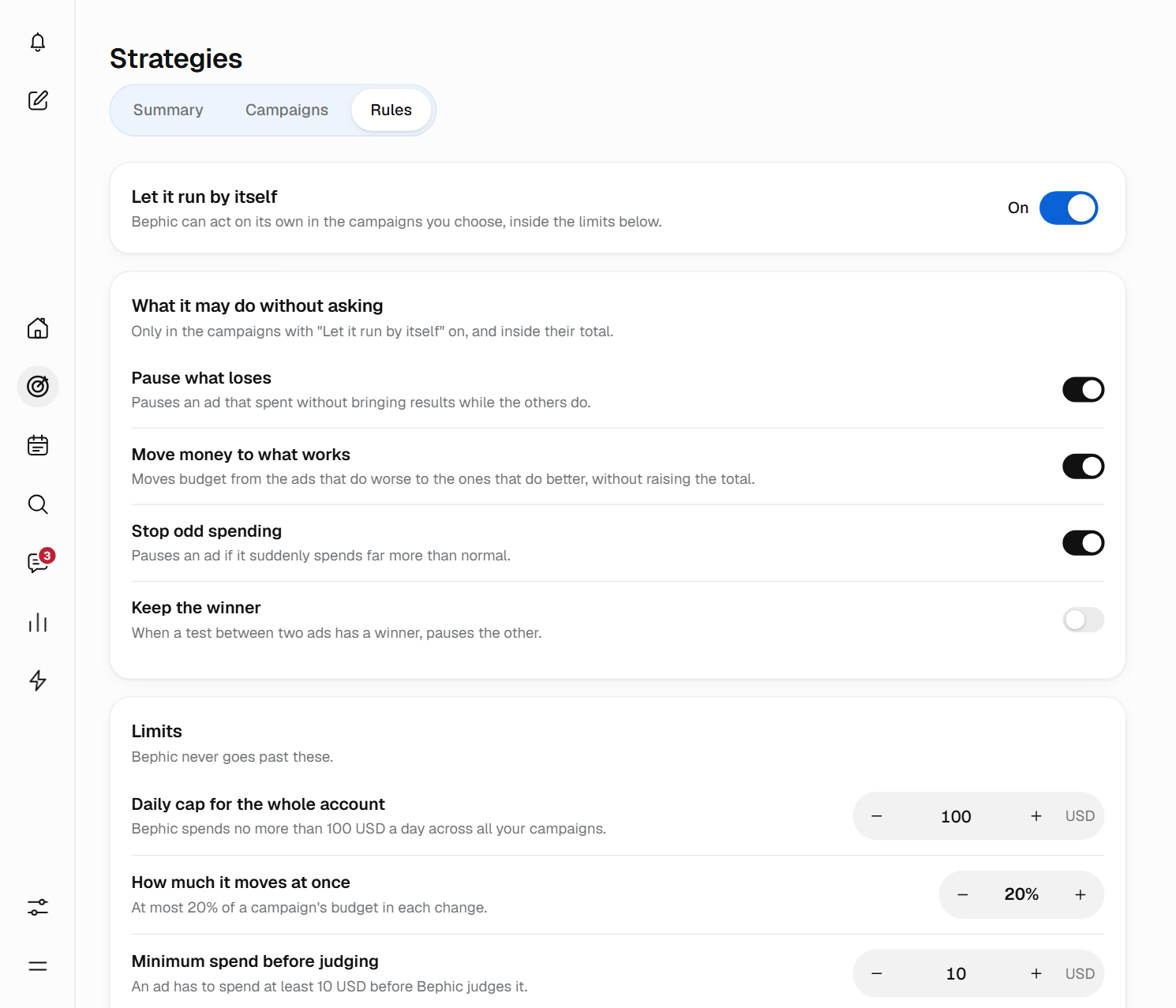
It is optional and starts off. If you turn it on, Bephic acts on its own only in the campaigns you choose and never goes over the daily cap you set. What can still be undone, you undo with one tap.
It is part of the paid plans. On the free plan, Bephic tells you what it would do.
What it can do on its own
- Pause what loses
- Pauses an ad that spent without bringing results while the others do.
- Move money to what performs
- Moves budget from the ads that perform less to the ones that perform more, without raising the total.
- Stop odd spending
- Pauses an ad if it suddenly spends much more than normal.
- Keep the winner
- When a test between two ads has a winner, it pauses the other.
The limits are yours
- Daily cap for the whole account
- Bephic never spends more than that amount a day across all your campaigns.
- How much it moves at once
- From 5% to 50% of a campaign's budget in each change.
- Minimum spend before judging
- An ad spends that amount before Bephic judges it.
Raising a campaign's total, creating a campaign or replacing an ad with a new one always asks you first.
Everything is recorded, and you can undo it
In “What was done”, inside Rules, you see each change with its date and who made it: You, Bephic with your yes or Bephic on its own. If it can still be undone, the change has an Undo button and a deadline.
Bephic only turns an ad back on after pausing it when you ask. Approving and changing the rules is for the owner or an administrator; with the “View only” role, you look at the ads without changing them.
Your account, your money
You connect your own Meta Ads, Google Ads or TikTok Ads account from Settings, in Connections, and sign in with the account that manages your ads. Your campaigns also show in each platform's ads manager.
Each platform charges you directly for what your ads spend, on the payment method of your ad account. Bephic never touches that money: it only charges you for your plan.
If your plan ends, Bephic pauses the campaigns it created and tells you. The ones you created outside Bephic it does not touch.
Start from your phone
Strategies works the same on the computer and on the phone: on the phone you tap Strategies in the bottom bar. There are three steps.
- Connect your ad accountIn Settings, Connections, you press Connect on Meta Ads, Google Ads or TikTok Ads and accept the permissions.
- Look at your numbersThe Overview shows what was spent and what it brought, in your currency.
- Decide each stepWhen Bephic recommends something, you say “Yes, do it” or “Not now”.
Strategies works together with
Questions about Strategies
Which ad platforms does Strategies work with?
With Meta Ads (your Facebook and Instagram ads), Google Ads and TikTok Ads. You connect your own ad account on each one and Strategies shows you everything together or one platform at a time.
Does Bephic spend my money without asking me?
No. It proposes and you decide each time. Only if you turn it on can it act on its own, in the campaigns you choose and without going over the daily cap you set. Raising a campaign's total, creating a campaign or replacing an ad with a new one always asks you first.
How much will I spend?
What you decide. When you create a campaign you choose how much to spend per day and for how many days, and Bephic tells you the most you will spend. Never more: that maximum is set on the platform itself.
Who charges me for the ads?
Each platform charges you directly for what your ads spend, on the payment method of your ad account. Bephic never charges or touches that money: it only charges you for your plan.
What happens when I say “Yes, do it” or “Not now”?
With “Yes, do it”, on paid plans Bephic makes the change; on the free plan it tells you what to change and you change it. With “Not now” nothing happens: the proposal goes away and Bephic tells you again if something changes.
Can I undo a change?
Everything that was done stays in a list, with who did it. What can still be undone, you undo with one tap.
Can it act on its own on the free plan?
No. On the free plan, recommendations are suggestions and you make the change. On paid plans, Bephic makes the change when you say yes, and it can act on its own if you turn that on.
Which currency do I see the money in?
In the currency of your ad account. Bephic does not change it: if you have accounts on several platforms with different currencies, each one shows its own.
What happens to my campaigns if my plan ends?
Bephic pauses the campaigns it created so they stop spending, and tells you on the bell with the name of each one. The ones you created outside Bephic it does not touch. Nothing turns back on by itself: you resume them.
Can I advertise with video?
Yes, on paid plans: MP4 or MOV up to 90 seconds. On the free plan, ads use a photo.
See what your ads bring you.
Connect your ad account and the Overview shows what was spent and what it brought, in your currency.