SEO
Get found on Google.
SEO works your business on Google. Bephic looks after your Google Business Profile every day, shows you how many times you were seen, prepares the answer to every review and tells you what to change first.
What SEO is
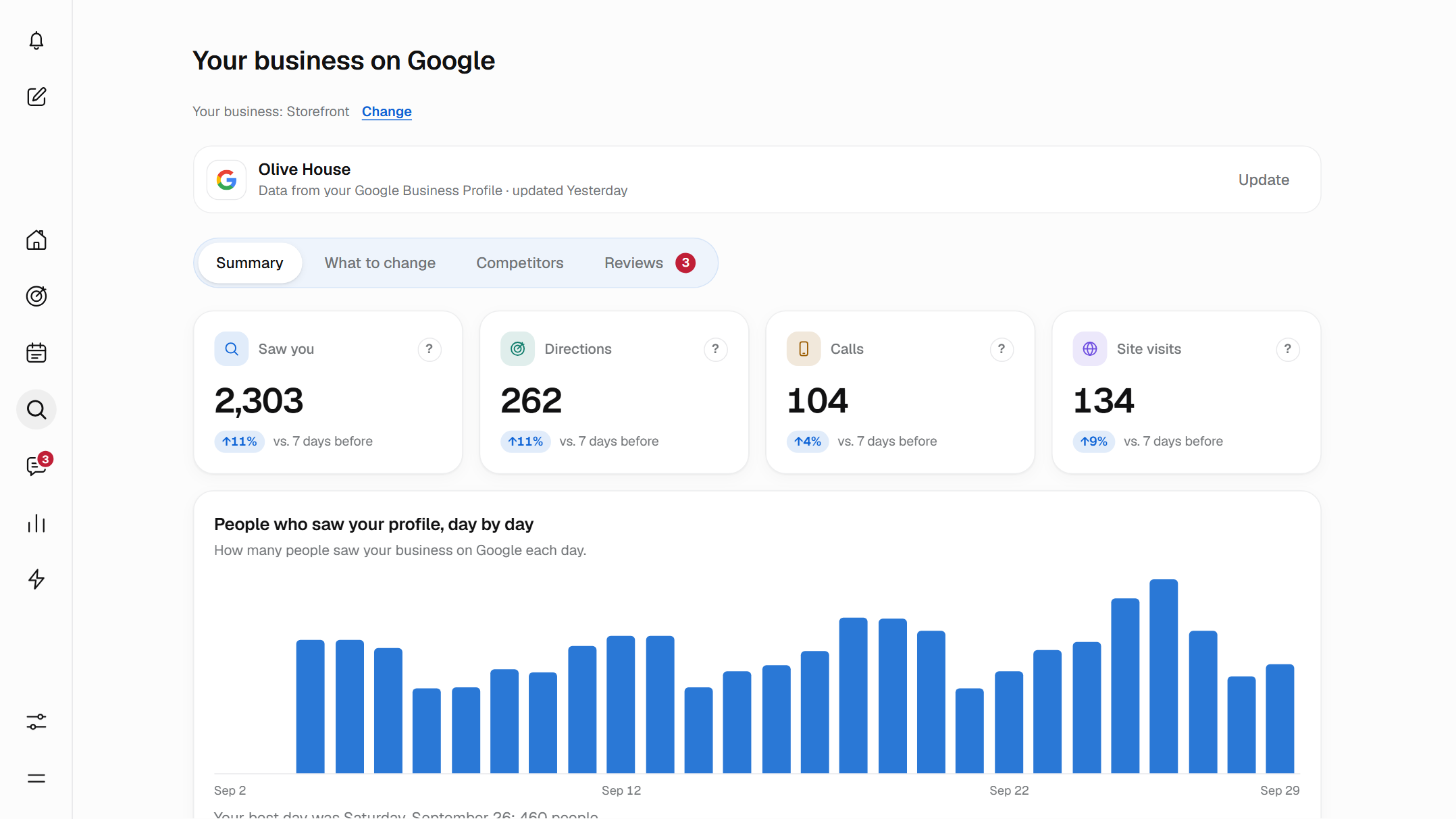
SEO is the part of Bephic that works what shows up when someone searches for your business on Google or Maps: your address, your hours, your photos and your reviews. It shows you your numbers, tells you what to change first, prepares the answer to every review and compares you with the businesses near you.
It works on every plan. On the free plan, Bephic shows you everything and leaves ready what needs doing, so you approve it or do it yourself on Google. With a paid plan, Bephic does it, within the permissions you give it, and also changes your profile's hours, description, attributes and photos on Google, whenever you confirm the change.
Your numbers, the ones Google sends
Every day, Google sends Bephic the numbers from your Business Profile for the last 7 days, compared with the 7 before.
- Saw youHow many times your business showed up on Google Search or Google Maps. These are times, not different people.
- DirectionsHow many people tapped “Directions” on your profile.
- CallsHow many people tapped “Call”.
- Site visitsHow many people went to your website from your profile.
Bephic does not calculate or estimate them: they are the same ones you see in your Google account. Google delivers them a few days late, so the last few days can change a little.
What people typed on Google to find you
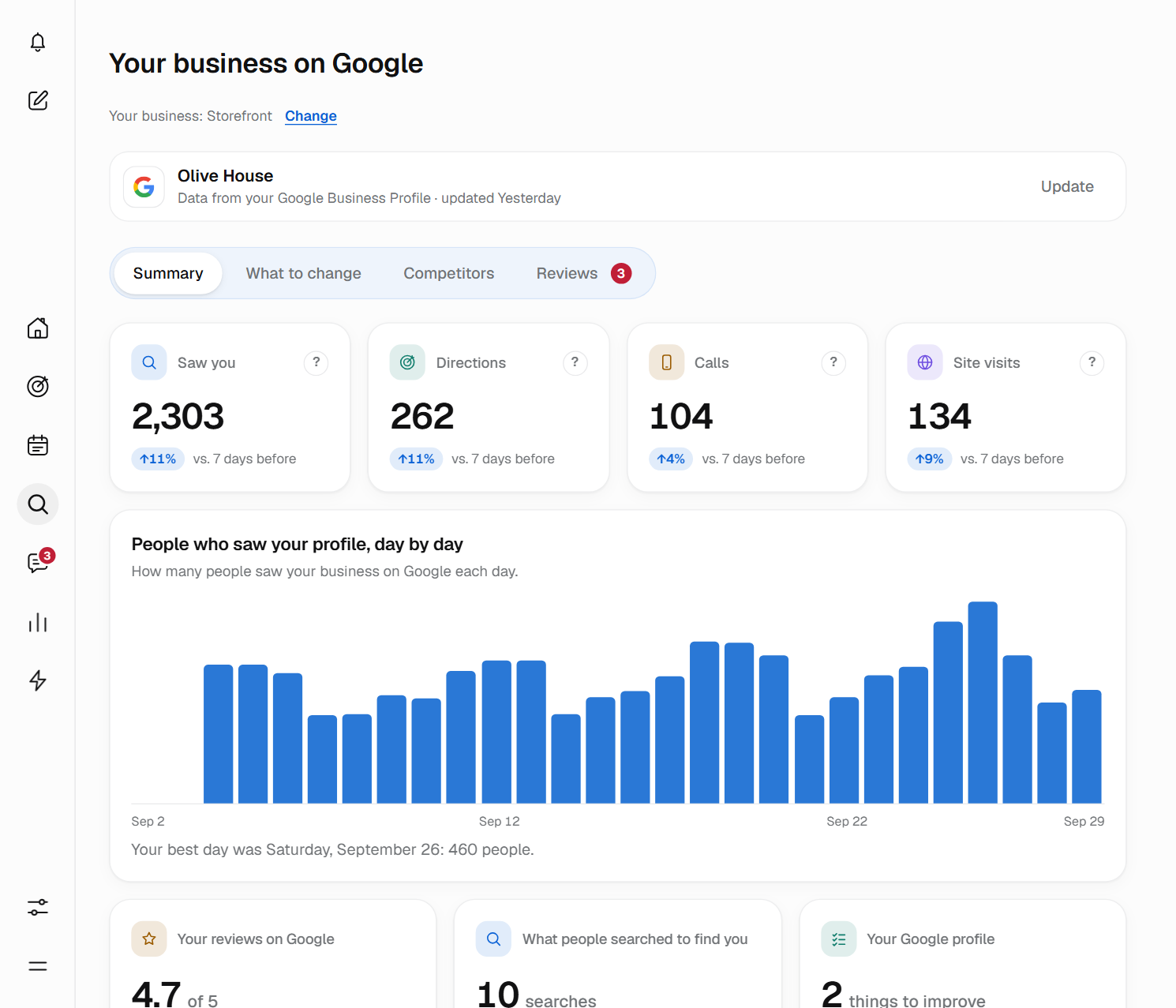
In “What people searched to find you” you see the searches Google showed you for last month, for example “barbershop near me” or “birthday cake”, and how many times they were made.
These are the words your people use. Use them in your profile’s description and services, in your posts and in the titles of your website. Not in your business name: Google can suspend your profile for that.
With a paid plan, next to each search you see where you show up and who comes first.

When someone searches for what you do, let them find you.
Every review arrives with the answer already written
When a new review arrives, the bell tells you: “New reviews to answer”. In the Reviews tab you find it with an answer prepared in your tone and with your business’s details.
You read it, change whatever you like and tap “Yes, post it”. It is posted on Google on behalf of your business. If you would rather not answer it, you tap “Do not answer”.
- Written for that reviewLong reviews or reviews with complaints get an answer written around what that person said.
- It never promises anythingNot money, not discounts, not gifts. That goes for what you write yourself too.
You decide who posts
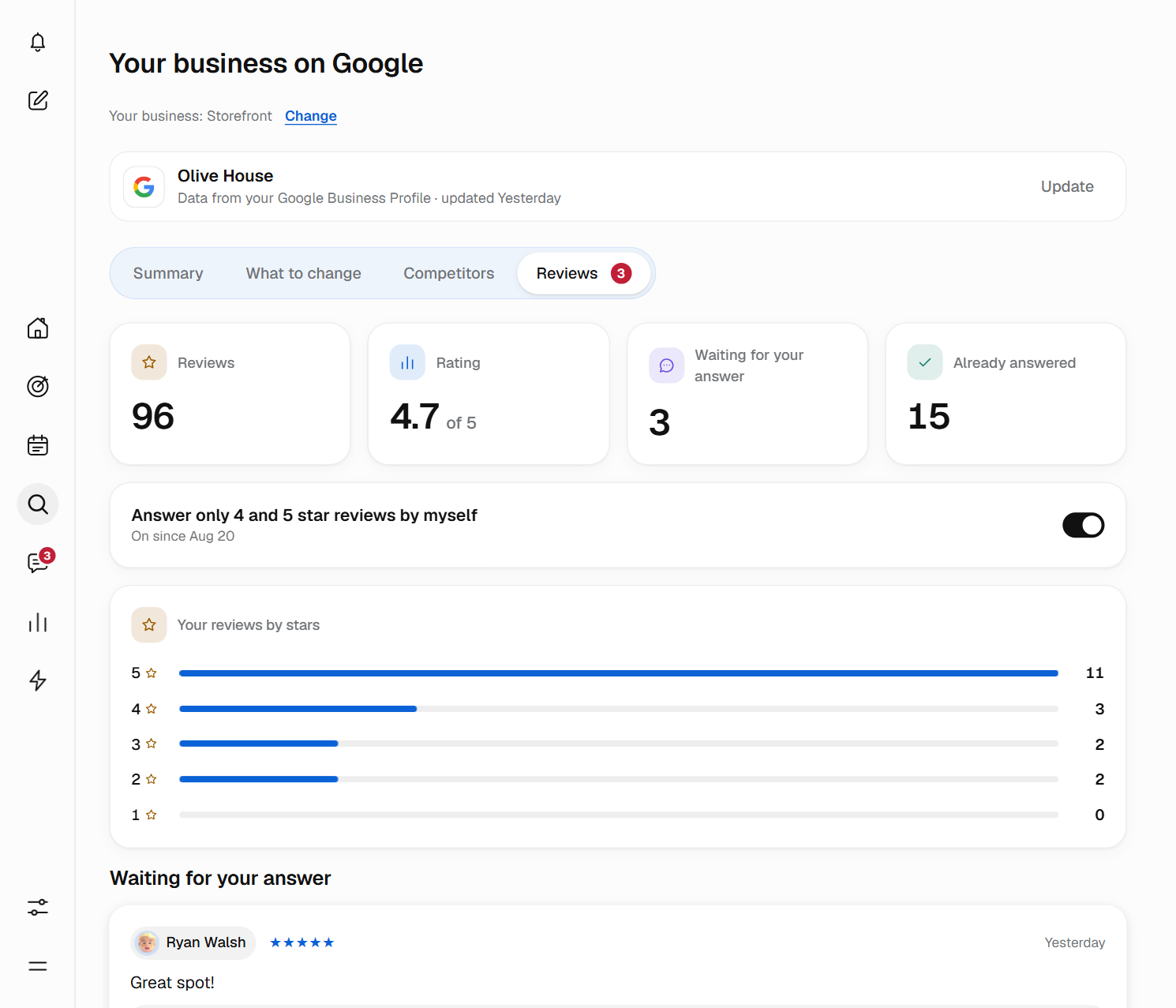
By default, you approve the answers. With a paid plan you can let Bephic answer some on its own, and you can always turn it off.
- You approve
- Every answer waits for your “Yes, post it”. This is how it starts.
- Answer only 4 and 5 star reviews
- Bephic posts only the answers to 4 and 5 star reviews of 25 words or fewer. You turn it on by reading what you authorize and tapping “Yes, I authorize”. The rest always wait for you.
- On the free plan
- You copy the answer with “Copy answer”, tap “Open on Google” and paste it there.
In “Already answered”, each one says who posted it and when. Only the owner or an admin can turn the automatic answers on or off.
In “What comes next”, Bephic tells you how many 5-star reviews per week you need to raise your rating and around what date you would get there. It is a calculation with today’s reviews, not a promise.
Ask for reviews after every sale
More recent reviews raise your rating and put you higher on Google. If you turn on “Ask for a review after every sale”, Bephic asks for them for you.
Every time you record a sale in Customers, Bephic writes to that person on WhatsApp, Instagram or Messenger, and only in the daytime, with the link to leave their review on Google. It asks everyone alike: Google does not allow asking only the happy ones or giving something in return.
In “Last 30 days” you see the sales recorded, the requests sent, the ones waiting and the ones that did not go out, with the reason. Every sale is recorded with what happened.
What to change first
In the What to change tab, Bephic puts into a single list what you should improve so people find you more. The first one helps you the most. It checks your profile every day, and what you already fixed disappears at the next check.
- Your website
- A title that says what you do, or a page that opens faster on a phone.
- Your profile
- Your holiday hours, your photos or your description.
- Reviews
- The ones waiting for your answer and the ones you need to raise your rating.
- Competition
- What the businesses near you have that you do not have yet.
Each point says how much it matters: “Matters a lot”, “Matters” or “Helps a little”. It comes with the why, the steps and a button that takes you to where it gets fixed, and when there is a text ready, like a description, you copy it with “Copy text”.
On the points Bephic can do for you, with a paid plan, you tap “You do it, Bephic” and when it finishes it tells you: “Done, Bephic did it.” On the free plan, it tells you what to do and you do it yourself.
Change your Google profile from Bephic
In “Your Google profile” you have “Edit” next to Hours, Special hours, Description, Attributes and Photos. On a paid plan, Bephic makes the change on Google, but first it shows you what it says now and what it would say after, and it only changes it when the owner or an admin taps “Confirm and change on Google”. Nothing reaches Google without that confirmation.
On the free plan, Bephic gets the change ready and you make it at business.google.com. A team member who is not an owner or an admin cannot change it, and in Permissions you can block Bephic from posting with that Google account.
Your website, as Google sees it
You tap “Check my website”, type its address and Bephic checks it. It gives you a score from 0 to 100 that reflects what Google sees in it: how fast it opens on a phone, how it looks, whether Google has it on its list and whether its title says what you do. And it tells you what to fix first.
- Speed on a phone
- A score from 0 to 100.
- Looks good on a phone
- Yes or No.
- Time to open
- The seconds it takes.
- Google has it on its list
- If it says No, Google does not show it in its results yet.
To check it, a robot called BephicSEO visits it. It looks at one page, the one you asked to check. On the free plan it checks it when you ask; on paid plans it also checks it again on its own from time to time, for example every week, as you set it up. It does not read robots.txt because it only visits the page its owner asked to check. It does not keep a copy of your page or use it to train any AI. Everything it does is on the page about Bephic’s robots.
If your profile already has your website, Bephic takes it from there. If you do not have a website, you tap “I don’t have a website” and carry on with the rest. On the free plan, checks have a monthly limit; with a paid plan you get more.

Your profile, your website and your reviews, looked after every day.
How you compare with the businesses near you
The first time, Bephic asks you “How do your customers find you?”: “I have a storefront”, “I go to the customer” or “I sell only online”. Depending on what you choose, it compares you in the way that makes sense for you.
In Competitors you see the businesses like yours near you, with their rating, their reviews and their photos, and what they have that you do not: more reviews, a better rating, more photos, opening hours or a better website. Below, “What you can improve against them”, with a button for each one. If you sell only online, you type the websites of up to 3 competitors and Bephic compares their score and speed with your website’s.
Where you show on Google Maps
If you have a storefront, in “Where you show” you see where you appear on Google Maps when someone searches for what you do, depending on where they search from.
- Nearby
- Someone searching very close to your business.
- 2 km
- Someone searching about 2 kilometers away.
- 5 km
- Someone searching about 5 kilometers away. It is normal to rank better nearby than far away.
It is approximate: Google changes the order depending on where each person searches from. Use it to see whether you are improving over time, not as an exact figure.
You always know what Bephic did
The numbers above are counted by Google. What Bephic does goes separately, in “What Bephic did”, each thing with its why: an answer posted, a service added to your profile, your customers’ new questions.
Every Wednesday morning, Bephic tells you about your week: it puts what Google showed of you next to what you sold in Customers, so you can see whether what happens on Google shows in your sales.
It also gathers the questions your customers repeat in chats and suggests them with an answer. The ones you approve become a code you paste on your website, so Google and AI assistants read them. For each question it keeps only how many times it was asked, never who asked it.
Your Google data is for showing to you. If you disconnect your profile, Bephic deletes what it had brought from Google.
Start by connecting your profile
You need a verified Google Business Profile that you own or administer. Without one, you can still check your website and compare yourself with your competition. There are three steps.
- Connect your Google Business ProfileIn SEO you tap “Connect with Google”, sign in with the account that manages your business and accept the permissions. It is a one-time thing, and your profile does not count toward your plan’s network limit.
- See your numbers and the What to change listYour first numbers arrive in a few minutes. Start with the first point on the list.
- Approve your reviewsEvery new review arrives with its answer written. You say “Yes, post it”.
If your Google account does not have a profile yet, create it for free at business.google.com, verify it the way Google asks and tap “Connect with Google” again. Bephic cannot create or verify it for you: Google does that with the business owner.
Bephic plans
From the Basic plan, your SEO looks after itself. Prices in US dollars per month.

Free · $0
No payment and no end date. You try almost everything with monthly limits: an assistant that helps you without AI, all your networks and ad accounts at once, posts up to a monthly limit where each network counts, and the help center.

Basic · $59 a month
The AI answers your customers on WhatsApp, Instagram and Messenger, your assistant works with AI, your ads and SEO look after themselves, you post with no limit and the other limits go up. Email support.
Pro · $199 a month
More AI each month, 2,500 contacts and a team of 3 that works with you, with priority support.

Max · $499 a month
The most AI and the highest limits each month, 7,500 contacts, a team of 10 and dedicated support.

Custom
For companies with several brands or shops, and for agencies: several accounts of each network, limits, contract and dedicated support agreed with you. You ask for it through Talk to sales.
Questions about SEO
What do I need to use SEO?
A verified Google Business Profile that you own or administer. You connect it from the panel with “Connect with Google” and Bephic starts bringing in your numbers and your reviews. If you do not have a profile, you can still check your website and compare yourself with your competition.
Where do the Google numbers come from?
From Google. It sends them every day from your Business Profile, compared with the previous 7 days. Bephic does not calculate or estimate them: they are the same ones you see in your Google account. Google delivers them a few days late, so the last few days can change a little.
Does Bephic answer my reviews on its own?
Only if you turn it on, on a paid plan, and only 4 and 5 star reviews of 25 words or fewer. To turn it on you read what you authorize and tap “Yes, I authorize”. Reviews of 3 stars or fewer, and longer ones, always wait for you to approve them with “Yes, post it”.
What happens with my reviews on the free plan?
Bephic leaves the answer to every review written for you. You tap “Copy answer”, then “Open on Google” and paste it there. With a paid plan, “Yes, post it” posts it without leaving Bephic.
Who does Bephic ask for reviews?
Only if you turn on “Ask for a review after every sale”. From then on it writes to each customer you record a sale for, on WhatsApp, Instagram or Messenger and only in the daytime, with the link to leave their review on Google. Everyone alike, because Google does not allow asking only the happy customers or giving something in return.
Can I change my hours or my photos on Google from Bephic?
Yes, with a paid plan. In SEO, under “Your Google profile”, you tap “Edit” next to Hours, Special hours, Description, Attributes or Photos. Bephic shows you what it says now and what it would say after, and only changes it on Google when the owner or an admin taps “Confirm and change on Google”. On the free plan, Bephic tells you exactly what to change and you change it on Google yourself. On a paid plan it also posts your answers to reviews and adds to your profile the services you approve.
What is BephicSEO?
It is the robot Bephic uses to check your website: when you ask it to in SEO and, on paid plans, also on its own from time to time, as you set it up. It looks at one page and does not read your robots.txt, because it only visits the page its owner asked to check. BephicBot, which looks at the home page of nearby businesses to compare them, does respect it. At bephic.com/bot you see everything they do.
What score does Bephic give my website?
A score from 0 to 100 based on what Google sees in it: how fast it opens on a phone, how it looks, whether Google has it on its list and whether its title says what you do. With it, Bephic tells you what to fix first. If you do not have a website, you tap “I don’t have a website”.
Where do I show on Google Maps?
If you have a storefront, in “Competitors” you see where you show on Google Maps when someone searches for what you do: near your business, at 2 km and at 5 km. It is approximate, because Google changes the order depending on where each person searches from. Use it to see whether you are improving, not as an exact figure.
What happens to my Google data if I disconnect my profile?
Bephic uses your Google data only to show it to you. If you disconnect your profile, it deletes what it had brought from Google.
Let them find you when they search for what you do.
Connect your Google Business Profile and see how many times you were seen this week.