Sign in Talk to sales
Back

Changelog

What is new in Bephic, what it does and why.

Announcements

Introducing Bephic

Today we are introducing Bephic, a panel for businesses that serve their customers one by one: restaurants, clinics, shops and salons. From one place it answers your messages, posts on your networks, looks after your ads and your Google Business Profile, and shows you what brings you customers.
Who it is for

Bephic exists so that businesses that serve their customers one by one have the tools of the big brands. It is made for businesses of every size, from people who run their business alone to companies with large teams, and you do not need to know about technology: you ask for everything in your own words, and Bephic shows you how it will turn out before it does anything.

It is for you if more people write to you than you can answer in time, if you want to post often but do not have time every day, if you pay for ads and are not sure what they bring you, or if you want people to find you on Google Maps and your reviews to get an answer.

What Bephic does

The panel has seven pages and you use only the ones you need. You connect each network once, with your permission, and without a connected account Bephic does not touch anything on it.

  • Messages. WhatsApp, Instagram and Messenger arrive in one inbox. Bephic answers with your business's information and, if it is missing something, it does not make it up: the chat moves to "Needs you" and you get a notice.
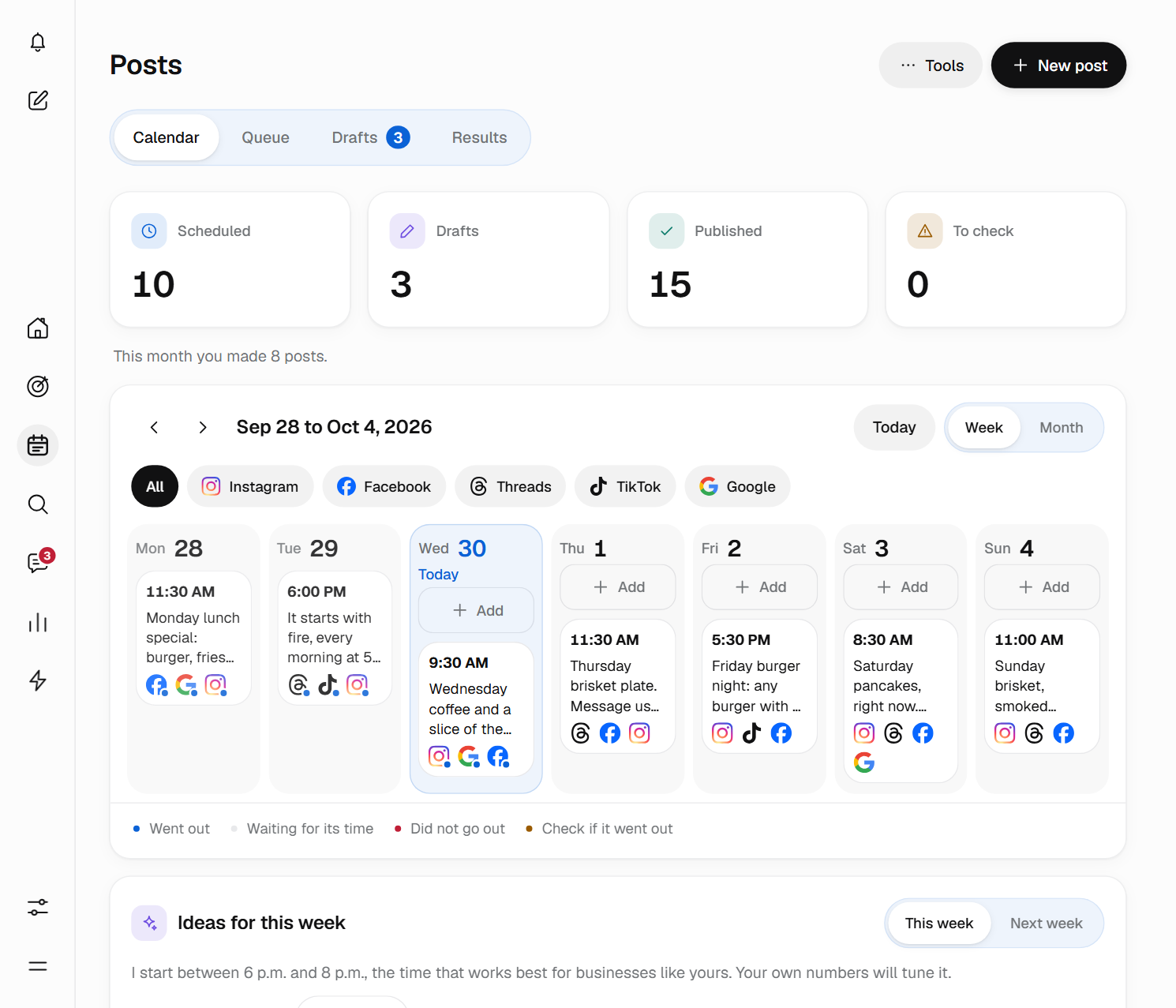
  • Posts. A calendar for Instagram, Facebook, Threads, TikTok and your Google Business Profile. You schedule it once, up to a year ahead, and it goes out on each network in the shape that network asks for.
  • Strategies. Your Meta, Google and TikTok ads in one place: what you spend, what each one brings you and what Bephic recommends you change. Each platform charges you for what you spend, directly.
  • SEO. Your Google Business Profile: the numbers Google sends every day, your reviews with the answer already written and a list of what to change first.
  • Results and Customers. Your month in four numbers compared with last month (new customers, people who talked to you, bookings and purchases) and a page for each person who came through Bephic, with their step and what they have bought from you.
  • Automations. A catalogue ready to turn on: answering anyone who comments a word, a welcome message, bookings by chat, and a link and a QR code so people write to you. Each one tells you what it brought you.

An assistant, and you decide

Your assistant is on Home. You write to it or talk to it as you would to a partner: "Who needs me?", "Where did my customers come from this month?" or "Answer anyone who comments price on my posts". It answers with your business's information or leaves the change ready for you. That is also where you turn on the AI that answers your customers, which starts off: you choose which networks it answers on, its tone, its hours and the amount above which it hands the chat to you.

Bephic proposes and you approve. Every change arrives as a card and nothing happens until you tap "Yes, do it". It does not spend your money or publish what it wrote without your yes. If you want it to do more on its own, you allow it in Permissions, within the limits you set, such as a daily cap for your ads.

It is an automated system and it can make mistakes, so check what it proposes before you approve it.

Your data and your customers' data

Your customers' data and their messages are never sold or rented, and are never used to show ads or to train any AI. If you leave "Help improve our AI models" on, which you can turn off any time in Settings, the way you use Bephic helps improve Neuraphic's AI. The conversations and the photos people send you are stored encrypted with your business's key, for 30 days.

You can export your data or delete your account whenever you want. If a customer asks you to delete them, you delete them from their page along with everything of theirs. Read Your data, exporting it and deleting your account.

How to get started

You can start on the free plan, which does not ask for a card and has no end date. It includes every page of the panel, with monthly limits. The AI that answers your customers, videos in your posts and sending photos in chats come with the paid plans, and you change plans when you need to.

To create your account there is no password: you type your email and sign in with the code you receive. Then connect the network where people write to you most, tell Bephic your hours, your prices and how people pay you, and turn on your first automation.

See where Bephic is available. The panel is in Spanish and English.
Product

Messages: WhatsApp, Instagram and Messenger in one inbox

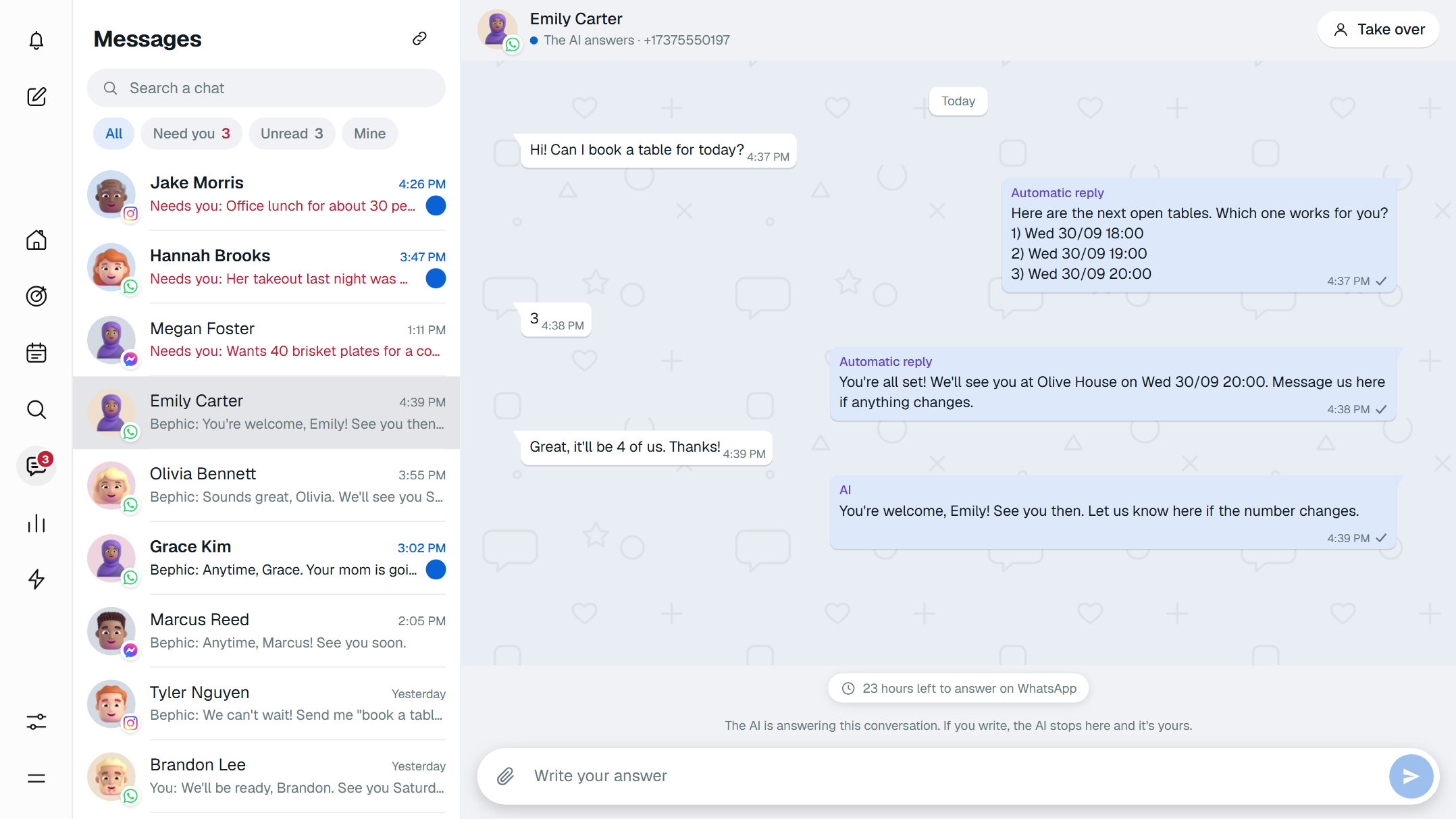
Messages brings your customers' conversations on WhatsApp, Instagram and Messenger into one inbox. Bephic answers with your business's details, and when a conversation needs a person, it passes it to you and lets you know. In each chat, you decide who answers.

One inbox for three networks

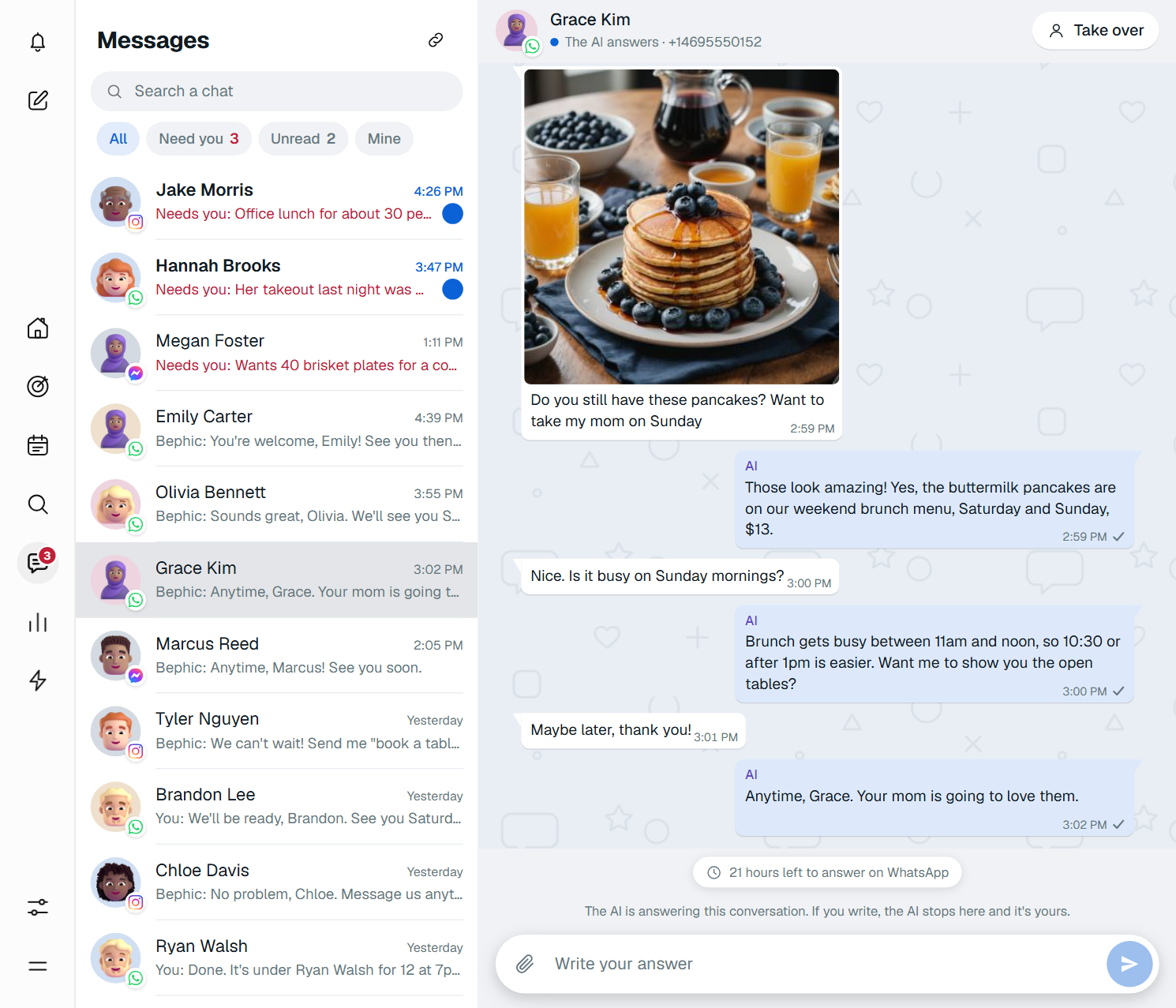
The list of chats is on the left and the conversation you opened is on the right, like WhatsApp Web. Each chat carries its network's logo on the customer's photo, and you can search by name, username, number or the last thing they wrote to you.

Above the list there are four filters: “All”, “Need you”, “Unread” and “Mine”. Chats waiting for a person come first, then the rest, newest first. The Messages icon tells you how many chats are waiting for a person.

You do not have to reload the page: the list updates by itself every few seconds. Inside a conversation, scrolling up loads earlier messages on its own.

Bephic answers, and passes you the chat when it should

Bephic's AI answers with what it knows about your business: your hours, your prices, your menu. It answers in your customer's language, Spanish or English, checks every reply before sending it and never makes up a price or a schedule. It also never gives discounts and never says it is a person: in its first message on Instagram and Messenger, and on WhatsApp to +1 numbers, it says it is an automated assistant; in other cases it says so when asked.

When it should not go on alone, it stops answering, moves the chat to “Need you” with the reason and lets you know. These are some of the reasons:

  • The customer asked to talk to a person.
  • Something seems to have upset them.
  • They asked something that is not in what Bephic knows about your business.
  • They want to buy for more than the amount you set.

When a chat moves to “Need you”, the bell rings with a notice and a “See the conversation” button. If nobody answers within 15 minutes, the bell reminds you. Every reason is in When Bephic needs you.

When you answer

With “Take over”, at the top right of the chat, you write and Bephic stops in that conversation. The other chats stay as they were, and the one you took shows up in your “Mine” filter. Simply writing to the customer also works: as soon as you send, the AI steps aside.

When you are done, “Hand it to Bephic” gives the conversation back. If you do not, the AI comes back by itself 24 hours after your last message. If someone on your team is already handling that chat, the dashboard asks you before you answer.

WhatsApp lets you write anything to a customer for 24 hours after their last message. It is a WhatsApp rule, not a Bephic rule. Each WhatsApp chat shows how much time you have left, and after that you pick one of your messages approved by WhatsApp and write to them anyway. Instagram and Messenger have no approved messages: after 24 hours, they do not let you write until the customer writes to you again. Read what WhatsApp's 24-hour window is.

Photos, stored on arrival

The photos customers send you are stored as soon as they arrive, without their location data and encrypted with your business's key. You see them large, move through every photo in the conversation with the arrows and download them whenever you want. Only people who are signed in and have access to that chat can see them.

Chats and their photos are kept for 30 days and are then deleted on their own. They are never sold or rented to anyone. More details in Photos in chats.

How to get started

Open Messages and tap “Your networks”, next to the title, or go to Settings, Connections. For WhatsApp you need a WhatsApp Business number; for Instagram, a professional account; for Messenger, your business's Facebook Page. From the moment you connect, every new message arrives in the inbox; what they wrote before is not brought in. See Connect your networks.

The AI starts off. To turn it on, ask the assistant on Home, for example “Turn the AI on for WhatsApp”, and press “Yes, do it”. On the free plan, Bephic uses one network at a time and your automatic replies answer; the AI and sending photos from the chat are part of the paid plans, which use all your networks at once. Everything about the inbox is on the Messages page.

Product

Posts: one calendar for Instagram, Facebook, Threads, TikTok and Google

We are introducing Posts, Bephic's calendar for Instagram, Facebook, Threads, TikTok and your Google business profile. You write once, pick the photo and the time, and Bephic posts it by itself on every network you checked, in the shape each one asks for. You can schedule it up to a year ahead.

One calendar for your whole week

Posts has four tabs: Calendar, Queue, Drafts and Results. In the Calendar you see your week or your month, filter by network and, on a computer, drag a post to another day without changing its time. Each post says whether it is scheduled, already went out or needs your attention.

To create one, you click New post, check under Where the networks it should go out on and write the text only once. If a network needs something different, under Text per network you write it its own text, for example a short version for Threads, which takes up to 500 characters. While you write, Check by network counts the characters and hashtags for each network and tells you what is missing before you schedule.

Besides a day and a time, you can make a post repeat every day, Monday to Friday, every week, every two weeks or every month, until the date you pick. You can send it to the Queue, which posts it in the next free slot of the times you set for your week. And if it is not ready yet, you save it as a draft, with no networks or time, until you schedule it.

Photos, videos and carousels

A post carries photos or a single video. With several photos it goes out as a carousel: you add up to 10 and people swipe through them one by one, in the order you leave them. Bephic shrinks each photo before uploading it and lets you crop it to the shape each network asks for.

Videos come with the paid plans: MP4 or MOV, up to 90 seconds and under 500 MB. Bephic checks each video before posting it, but you do not have to wait for the check to finish to schedule: if the time comes and it is still being checked, the post goes out as soon as it finishes. This is how it goes out on each network (the full list is in formats and limits):

  • Instagram: post, Reel or story, always with a photo or video. Up to 2,200 characters, 30 hashtags and 10 photos. A video story runs up to 60 seconds.
  • Facebook: long texts, photos and videos on your page, and a first comment if you want one.
  • Threads: texts of up to 500 characters, with or without a photo.
  • TikTok: always with a photo or video, and the video from 3 to 90 seconds. You choose who can see it and whether it is a commercial post.
  • Google: texts of up to 1,500 characters on your business profile, with one photo or none. It does not take videos or several photos.

Times written the way you say them

The dashboard writes times the way people say them: 9 in the morning, 3 in the afternoon, 8 at night. Before you press the button, one sentence tells you exactly what will happen, for example “It will go out on Instagram and Facebook tomorrow, Thursday, at 9 in the morning.”

Times are your business's time. If you pick 9 in the morning, it goes out at 9 where your business is, even if you are traveling. If you sell to customers in another country, you can change the time zone of a single post so they see it in their morning.

If a network turns it down

Each network sets its own rules, and Bephic checks them before you schedule. If something still does not go out, the post is marked Did not go out in the Calendar, with the reason on each network and a button to fix it: Reconnect if the connection expired, or Change and schedule if the network did not accept the photo, the video or the text.

If the network did not answer or reached its daily post limit, Bephic tries again by itself, a few minutes later and up to three times. A post that would go out more than 6 hours late is not posted, because it is better for you to decide whether it still makes sense. Every reason, with its fix, is in Why did my post not go out?

How to get started

Connect your networks in Settings, Connections, open Posts and click New post. On the free plan you post photos on one social network plus your Google Business Profile. On a paid plan you use every network you connect, with videos too.

If you already have the month in a spreadsheet, in Tools, Upload many posts, you upload a CSV file of up to 200 rows and Bephic checks each row before creating the posts. The steps are in How do I schedule many posts with a file?

Product

Automations: a catalog ready to switch on

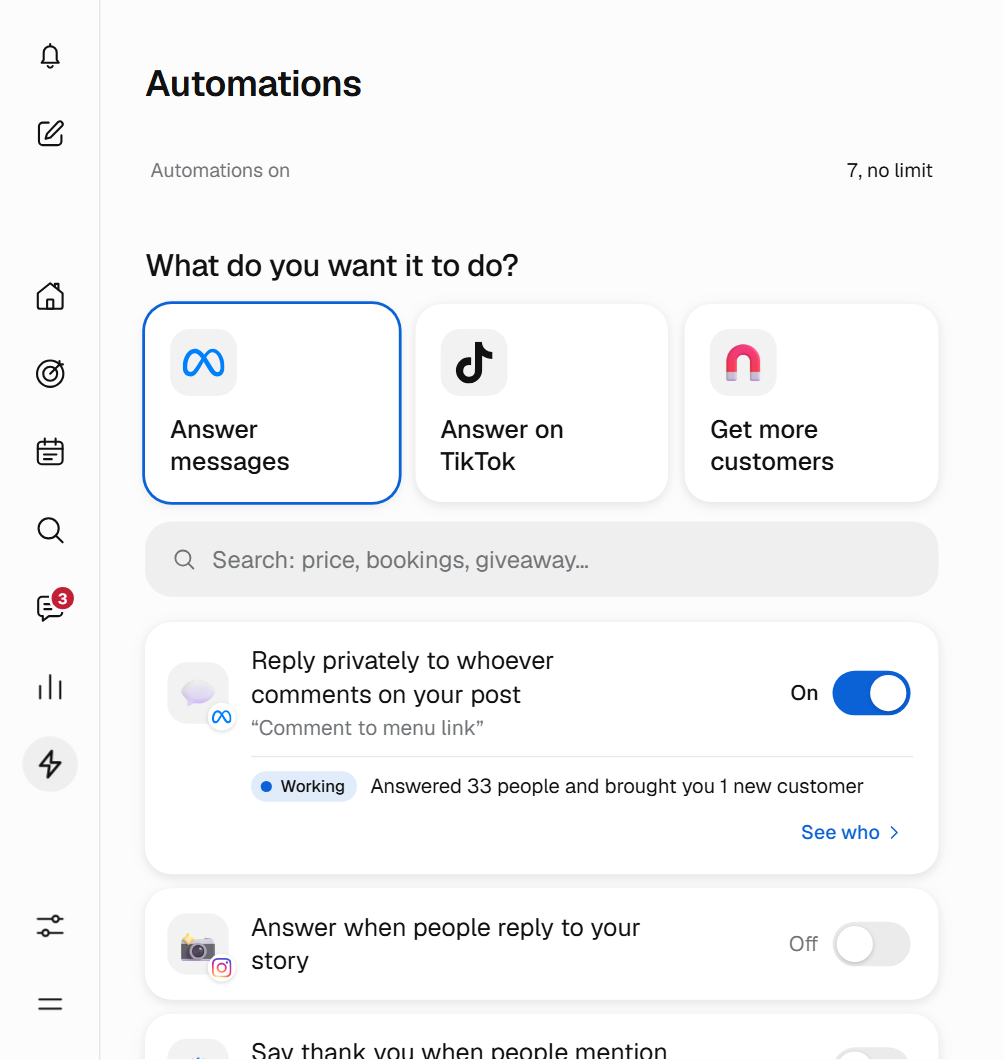
Automations brings together in one catalog what Bephic can do on its own for your business, organized in three groups: Answer messages, Answer on TikTok and Get more customers. You choose what you want it to do, write the message once and switch it on. From then on, every answer goes out with the rules you approve.

Answers for what people always ask

The Answer messages group works on Instagram, Messenger, WhatsApp and Threads, and answers what your customers write every day. A few examples:

  • Comment reply with a link. Whoever comments on your post or reel with a word, like “price”, gets your message privately right away, with your link if you added one.
  • Story replies. Whoever replies to one of your Instagram stories gets your message in their inbox. You can answer everyone or only those who write a word, like “order”.
  • Keyword reply. Up to 20 words, like “hours” or “how much”. It answers even when the message has more text.
  • Welcome and away reply. The greeting goes out only the first time someone writes to you on that network. The away note goes out when nothing else answered, at most once a day per person.
  • Chat menu. Up to 20 buttons, like “Hours” or “Orders”, that answer something or open a link.

The Answer on TikTok group greets whoever opens your chat, answers by keyword within 48 hours of the message and offers up to 3 ready questions to tap, depending on what TikTok allows in your country. On Threads, Bephic answers under the comment, in public, and can hide comments with insults.

Bookings, giveaways and tests to get more customers

With booking by chat, you choose the days, the hours, how long each appointment lasts and how many people you see at once. When someone writes one of your words, like “appointment”, Bephic offers them only the free times and saves the booking.

A giveaway on Instagram can run for up to 90 days. Bephic notes each entrant only once and, at closing time, draws the winners at random, with a fingerprint that lets anyone check later that the result was not changed. In an A/B test, half the people get message A and the other half message B, and you keep the one that works. The chat link and its QR code take people to your WhatsApp, Instagram or Messenger, and the QR code downloads ready to print.

Switching one on means answering three questions

You tap the automation's row and its sheet opens. Under Where? you choose the chats, under When? what sets it off (for example, your keywords) and under What do you say? you write the message the way you would say it in person. Next to it you see This is what your customer will see. Then you press Switch on, or Save without switching on if you do not want it working yet.

You change the message whenever you want with Save changes. When you switch it off it stops acting, but it keeps its message and its settings. If you do not know which one to pick, type what you want in the search box, like “price” or “bookings”, or ask the assistant to set one up for you. Each one tells you in one word how it is doing: Working, Still learning or Not working.

Limits that look after your customers

These rules apply on every plan and you do not have to set them up:

  • No more than five automatic messages a day to the same person.
  • From 10 pm to 8 am, in the customer's time, scheduled messages wait until morning. Answers to someone who just wrote do go out.
  • Anyone who replies STOP stops getting automatic messages, without you having to do anything.
  • On Instagram and Messenger, messages go out only within 24 hours of the person's last message, and each comment gets only one private message.

If someone reports your messages or Meta blocks sends, Bephic pauses your automatic messages to look after your account and tells you why. The free plan has a limit on automations on at once; paid plans have more. Bephic does not charge per message, and the panel warns you on the automations that may have a cost from WhatsApp. See all the limits and rules.

How to get started

Connect the network where you want it to answer. An automation does not switch on until it is complete and its network is connected, and if something is missing the panel tells you what. See Connect your networks.

Then open Automations in your panel and start with the comment reply with a link: you choose the word, write the message and switch it on. The guide How automations work explains each group, and the Automations page shows everything they do.