Product
Posts: one calendar for Instagram, Facebook, Threads, TikTok and Google
We are introducing Posts, Bephic's calendar for Instagram, Facebook, Threads, TikTok and your Google business profile. You write once, pick the photo and the time, and Bephic posts it by itself on every network you checked, in the shape each one asks for. You can schedule it up to a year ahead.
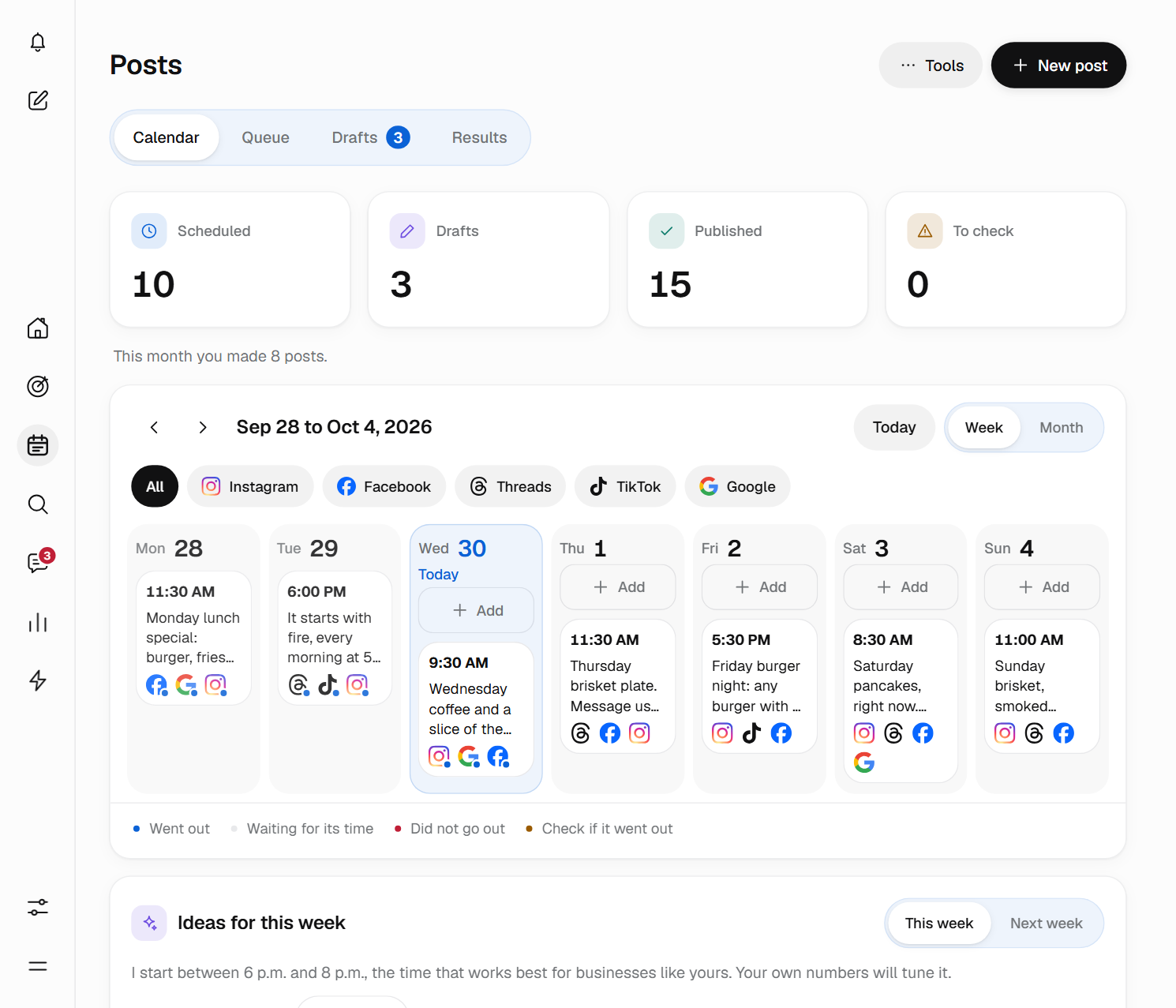
One calendar for your whole week
Posts has four tabs: Calendar, Queue, Drafts and Results. In the Calendar you see your week or your month, filter by network and, on a computer, drag a post to another day without changing its time. Each post says whether it is scheduled, already went out or needs your attention.
To create one, you click New post, check under Where the networks it should go out on and write the text only once. If a network needs something different, under Text per network you write it its own text, for example a short version for Threads, which takes up to 500 characters. While you write, Check by network counts the characters and hashtags for each network and tells you what is missing before you schedule.
Besides a day and a time, you can make a post repeat every day, Monday to Friday, every week, every two weeks or every month, until the date you pick. You can send it to the Queue, which posts it in the next free slot of the times you set for your week. And if it is not ready yet, you save it as a draft, with no networks or time, until you schedule it.
Photos, videos and carousels
A post carries photos or a single video. With several photos it goes out as a carousel: you add up to 10 and people swipe through them one by one, in the order you leave them. Bephic shrinks each photo before uploading it and lets you crop it to the shape each network asks for.
Videos come with the paid plans: MP4 or MOV, up to 90 seconds and under 500 MB. Bephic checks each video before posting it, but you do not have to wait for the check to finish to schedule: if the time comes and it is still being checked, the post goes out as soon as it finishes. This is how it goes out on each network (the full list is in formats and limits):
- Instagram: post, Reel or story, always with a photo or video. Up to 2,200 characters, 30 hashtags and 10 photos. A video story runs up to 60 seconds.
- Facebook: long texts, photos and videos on your page, and a first comment if you want one.
- Threads: texts of up to 500 characters, with or without a photo.
- TikTok: always with a photo or video, and the video from 3 to 90 seconds. You choose who can see it and whether it is a commercial post.
- Google: texts of up to 1,500 characters on your business profile, with one photo or none. It does not take videos or several photos.
Times written the way you say them
The dashboard writes times the way people say them: 9 in the morning, 3 in the afternoon, 8 at night. Before you press the button, one sentence tells you exactly what will happen, for example “It will go out on Instagram and Facebook tomorrow, Thursday, at 9 in the morning.”
Times are your business's time. If you pick 9 in the morning, it goes out at 9 where your business is, even if you are traveling. If you sell to customers in another country, you can change the time zone of a single post so they see it in their morning.
If a network turns it down
Each network sets its own rules, and Bephic checks them before you schedule. If something still does not go out, the post is marked Did not go out in the Calendar, with the reason on each network and a button to fix it: Reconnect if the connection expired, or Change and schedule if the network did not accept the photo, the video or the text.
If the network did not answer or reached its daily post limit, Bephic tries again by itself, a few minutes later and up to three times. A post that would go out more than 6 hours late is not posted, because it is better for you to decide whether it still makes sense. Every reason, with its fix, is in Why did my post not go out?
How to get started
Connect your networks in Settings, Connections, open Posts and click New post. On the free plan you post photos on one social network plus your Google Business Profile. On a paid plan you use every network you connect, with videos too.
If you already have the month in a spreadsheet, in Tools, Upload many posts, you upload a CSV file of up to 200 rows and Bephic checks each row before creating the posts. The steps are in How do I schedule many posts with a file?