Automations
The usual things, done on their own.
Choose what you want done, write the message once and turn it on. Bephic answers comments, stories and messages, books appointments, runs giveaways and tells you what each one brought you.
What automations are
An automation is something Bephic does on its own, with a message you write and rules you approve. When it is off, it does nothing.
They answer on Instagram, Messenger, WhatsApp and Threads, and on TikTok too. Replies by keyword, greetings and buttons work on the free plan. With a paid plan, the AI also answers everything no automation answered.
Three groups, by what you want to achieve
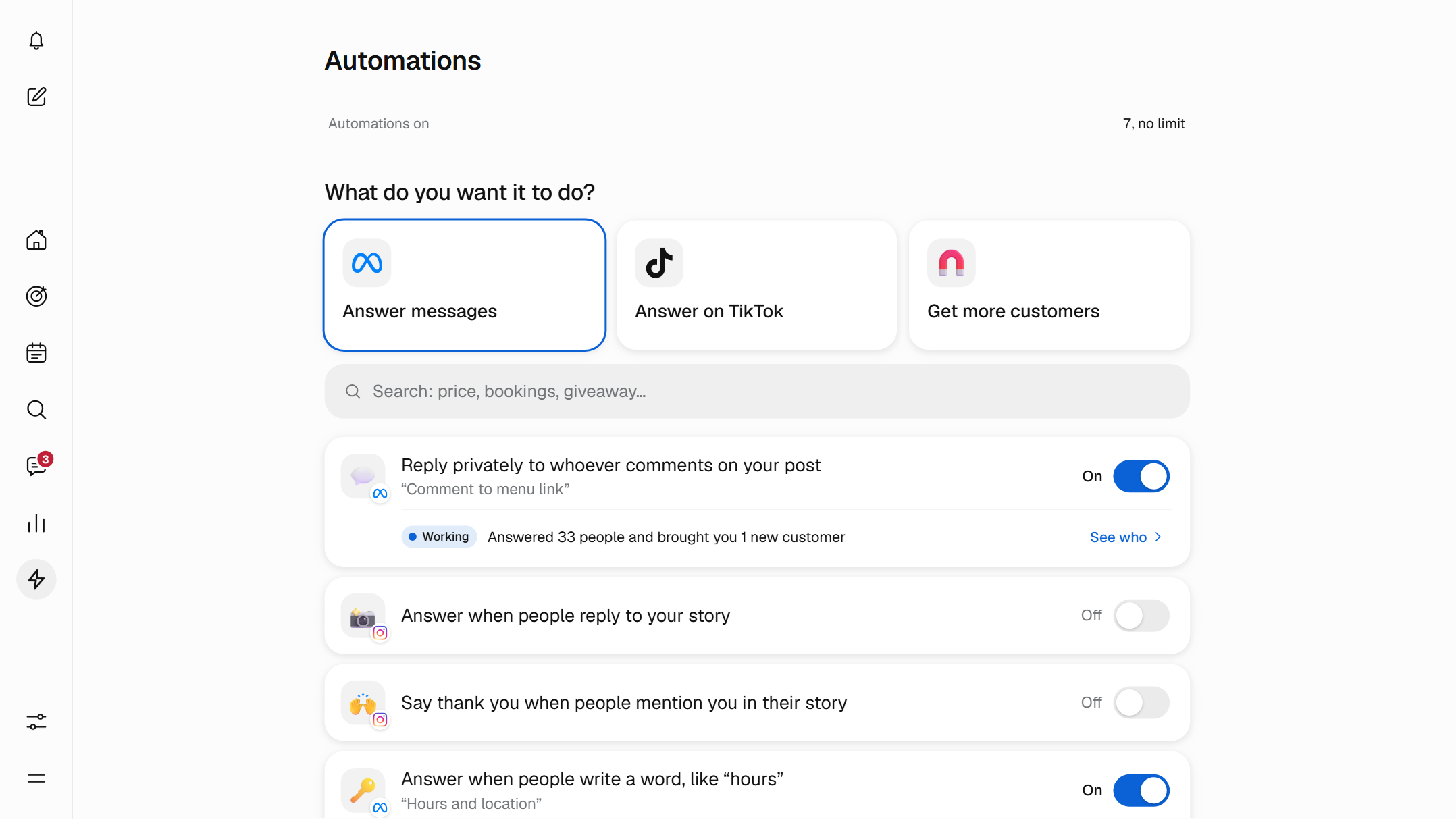
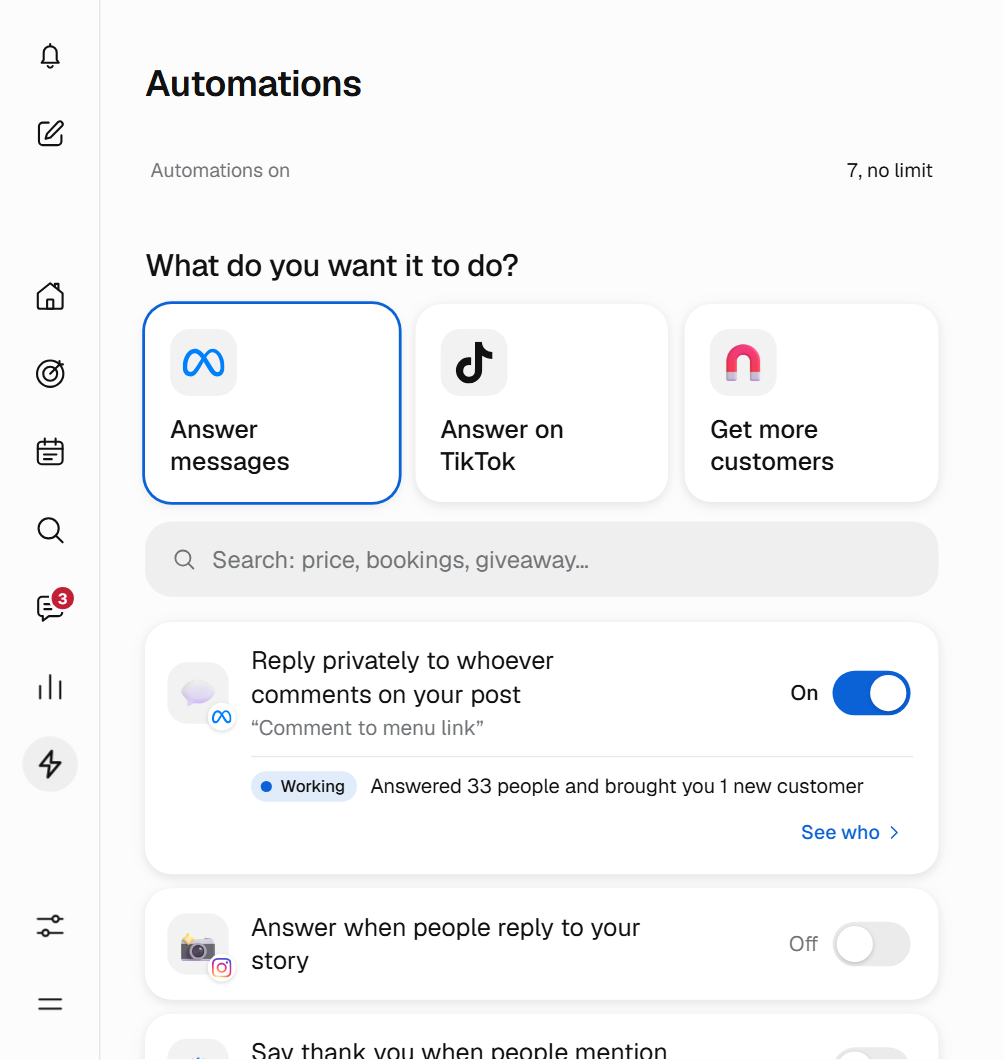
In Automations, each automation is a tile, sorted into groups by what it does: Answer messages, Comments and stories and Get customers. You tap one and its panel opens.
If you do not know which to pick, type what you want in the search box, such as «price», «appointments» or «giveaway», and Bephic takes you to the one you need, even if you misspell it.
Someone comments «menu». Bephic writes to them in private.
You choose the word and write the message once. From then on, every comment, every story and every repeated question gets an answer, day and night.
- Three questionsWhere?, When? and What do you say? Next to them you see how it will look in the chat before you turn it on.
- Nothing turns on half doneAn automation does not turn on until it is complete and its network is connected. If something is missing, the panel tells you what.
What Bephic answers for you
These are the ones that answer messages, comments and stories, in the panel's own words.
- Reply privately to whoever comments on your post
- Every comment on Instagram or on your Facebook page gets your message in private, with your link if you want.
- Answer when people reply to your story
- Whoever replies to one of your Instagram stories gets your message right away.
- Say thank you when people mention you in their story
- Whoever mentions you gets your thanks and, if you want, a coupon with a code just for that person.
- Answer when people write a word, like “hours”
- What people always ask is always answered the same way, with up to 20 keywords per automation.
- Greet people who write to you for the first time
- Your greeting goes out right away, and only the first time on each network.
- Put buttons in your chat, like “Hours” or “Orders”
- Your customers tap a button and get the answer, without typing.
- Answer people who write to you from your ad
- Whoever starts writing to you from an ad that opens the chat gets your message right away.
- Let people know you will answer soon
- If nothing else answered, the customer knows you read it, at most once a day.
On Threads, Bephic replies in public under the comment and hides comments with insults.

You open the shop. Bephic answers the chat.
Your customers book by writing to you
With Booking by chat there are no calls and no waiting. The customer writes your keyword, for example «appointment». Bephic offers the free slots, numbered, and the customer answers with a number.
The booking is confirmed and shows up in your Google Calendar. Bephic does not offer times when you already have something.
You set the schedule
- Days you take bookings
- You choose the days of the week.
- From and To
- Your opening hours.
- Minutes per appointment
- How long each appointment lasts.
- How many people do you see at once?
- With 1, each slot is for one person; with more, several fit.
It works on Instagram, WhatsApp and Messenger. Whoever books moves to the «Booked» stage in your customer list, and Results counts the appointment.
Giveaways with a fingerprint
Bephic logs everyone who enters on Instagram, confirms they are in and, at closing time, picks the winners at random from all the entries.
People enter by commenting on a post, writing a keyword or mentioning you in their story. A giveaway can run for up to 90 days and you can have from 1 to 100 winners. Each person enters only once.
Bephic keeps a fingerprint of all the entries. You can publish it to show the list was not changed.
On TikTok and Threads too
In the Answer messages group, next to the others, there are three automations for your TikTok account's messages. They depend on where you are: if TikTok does not allow automatic messages there yet, the panel tells you.
- Greet whoever opens your TikTok chat
- Whoever opens the chat with your account sees your greeting. TikTok reviews it before showing it.
- Answer when someone writes a word, like «price»
- Whoever writes your word to you on TikTok gets your answer.
- Put ready questions in your chat, with their answer
- Up to 3 questions your customers tap, each with its answer.
Threads has no private messages: your reply sits under the comment and everyone sees it, so you write it with that in mind. Bephic never replies to a comment with insults.
So more people write to you
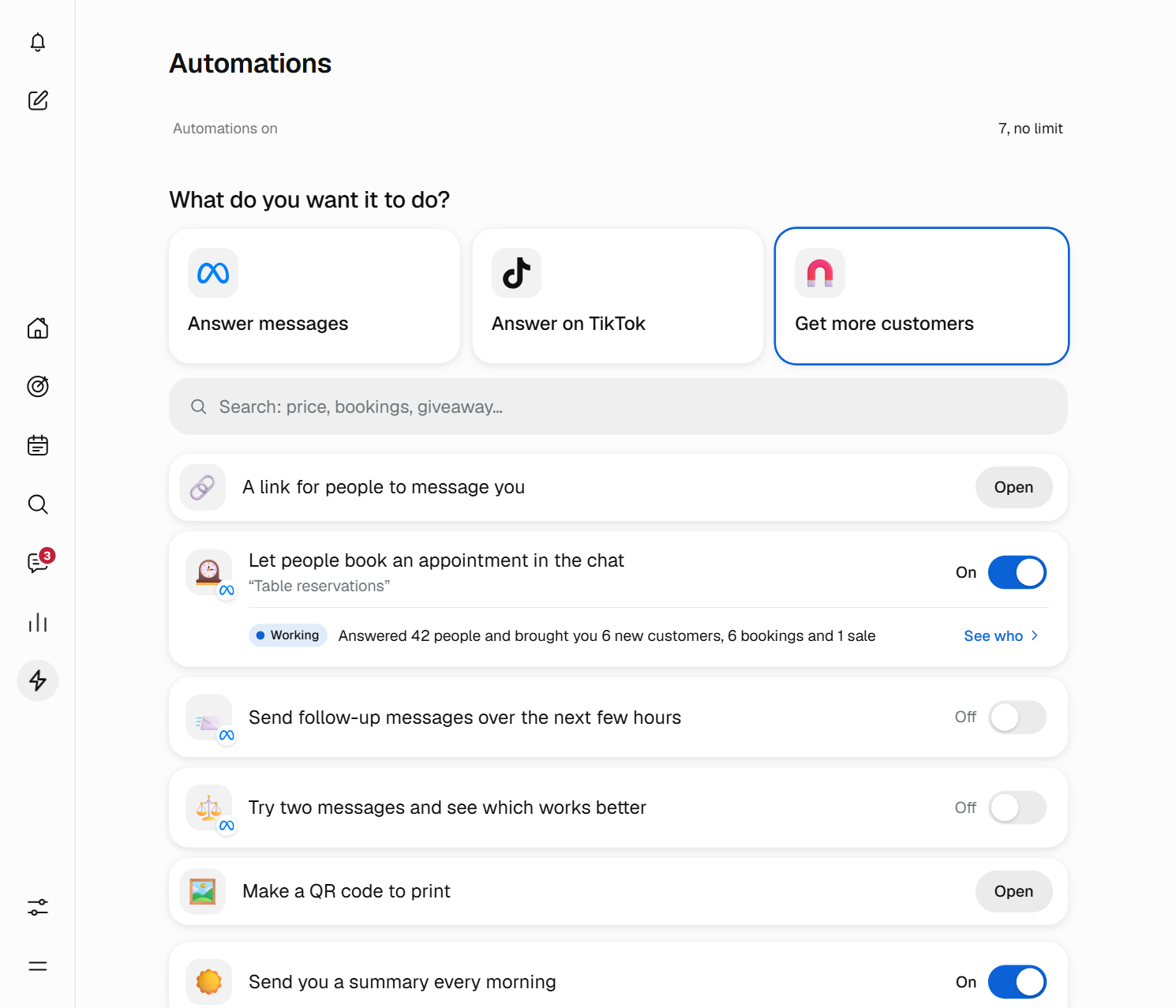
The Get customers group has what it takes to bring people to your chat.
- A link for people to message youYou paste it in your profile or on a sign. Whoever taps it opens your WhatsApp, Instagram or Messenger chat.
- A QR code to printIt downloads ready for the table, the window or a flyer, and can be enlarged without losing quality.
- Follow-up messagesUp to 10 messages over the following hours, which stop if the person replies.
- Test two messagesHalf get A and the other half get B. Bephic tells you which gets more replies.
They look after your customers
These rules apply on every plan and you do not have to set them up.
- Never more than 5 automatic messages a dayto the same person.
- Quiet at nightFrom 10 at night to 8 in the morning, in the customer's time, messages that are not an immediate reply wait until morning.
- Whoever says no gets no moreWhoever writes BAJA or STOP stops receiving automatic messages.
- Each network's rulesOn Instagram and Messenger, messages go out within 24 hours of the person's last message. A comment gets one private message, within the following 7 days.
- Your automations firstThey answer before the AI. What you want said the same way every time, like a price, goes out exactly as written.
And on WhatsApp, this costs
Bephic does not charge per message. WhatsApp charges for each message an automation sends on WhatsApp, including replies to your customers, to your WhatsApp account's card. The only exception is the 72 hours after someone writes to you from a WhatsApp ad. On Instagram and Messenger there is no per-message charge.
Each automation's panel tells you when it includes WhatsApp, and the bell tells you when WhatsApp charges you.
It tells you what each one brought
Under each automation that writes to your customers you see what it did this month and a one-word verdict.
- Working
- It brought you someone: a new customer, an appointment or a sale.
- Still learning
- It is replying, but has not brought you anyone yet. Give it time or improve its message.
- Not working
- More messages were stopped than went out. Check why.
A sentence spells it out, for example «Replied to 34 people and brought you 8 new customers, 3 appointments and 1 sale». With «See who» you open your customer list filtered by that automation.
Start from your phone
Automations works the same on your phone and on a computer. There are three steps.
- Pick oneTap its tile, or type in the search box what you want to achieve.
- Write the messageAnswer Where?, When? and What do you say?, the way you would say it in person. If you prefer, ask the assistant and it leaves it ready for you.
- Turn it onPress Switch on. You can change the message or switch it off whenever you like: when it is off, it keeps its message for next time.
Questions about Automations
Do I need to know how to code?
No. You pick one from the catalog, answer three questions (where, when and what you say) and turn it on. There are no rules or diagrams to build.
How many can I have on?
The free plan has a limit on automations on at the same time; paid plans have more. The «Automations on» counter, at the top of Automations, tells you how many you have. Automations that are off do not count.
What answers first, an automation or the AI?
Your automations answer first. The AI, on a paid plan, only answers what no automation answered.
Does Bephic charge me for each message?
No. Bephic does not charge per message. WhatsApp does charge for each message an automation sends, to your WhatsApp account's card, except during the 72 hours after someone writes to you from a WhatsApp ad. On Instagram and Messenger there is no per-message charge.
How do appointments by chat work?
The customer writes your keyword, for example «appointment». Bephic offers the free slots, numbered, the customer answers with a number and the booking is confirmed and entered in your Google Calendar.
How do I know a giveaway was fair?
Bephic picks the winners at random from all the entries and keeps a fingerprint of them. You can publish that fingerprint to show the list was not changed.
What if someone does not want to receive messages?
Whoever writes BAJA or STOP stops receiving automatic messages, without you doing anything. Also, Bephic never sends more than 5 automatic messages a day to the same person and sends no scheduled messages between 10 at night and 8 in the morning.
Do they work on TikTok and Threads?
Yes. On TikTok there are three automations, depending on your country: greet whoever opens your chat, answer when someone writes a word and put ready questions in your chat. On Threads, Bephic replies in public under the comment and hides comments with insults.
Can I ask the assistant for an automation?
Yes. Tell it, for example, «answer whoever comments price on my posts», and it leaves it ready for you to say yes. It can also turn them on, turn them off or change their message.
What do I need to get started?
Connect the network where you want it to answer. An automation does not turn on until it is complete and its network is connected, and if something is missing the panel tells you what.
Turn on your first automation today.
Start by answering whoever comments on your post: you choose the word, write the message and turn it on.